초기 설정

처음 PuTTY를 실행 시키고 Hostname에 bandit.labs.overthewire.org, Port에 2220를 입력하고 Open하면Bandit 서버로 들어갈 수 있습니다.
Bandit Level 0
https://overthewire.org/wargames/bandit/bandit0.html
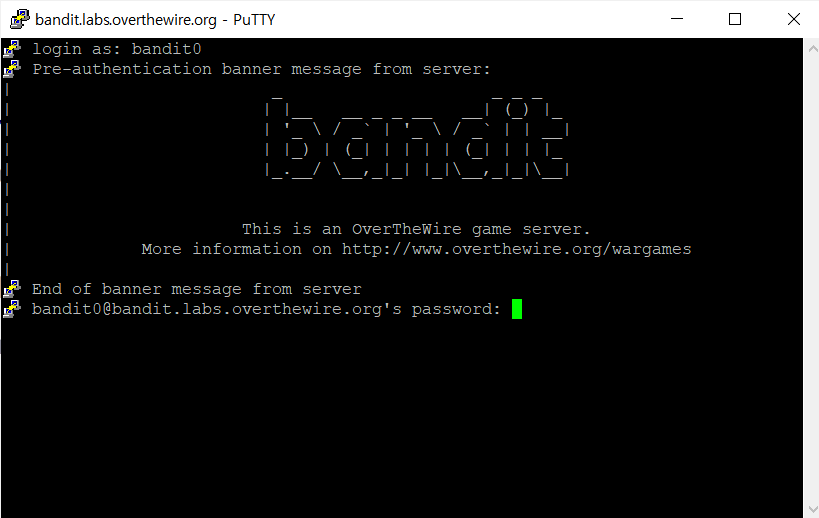
user id는 bandit0, password는 bandit0입니다. password는 보안상의 이유로 표시되지 않습니다.
(user id와 password는 bandit0 링크에 나와있습니다.)
Bandit Level 0 → Level 1
https://overthewire.org/wargames/bandit/bandit1.html
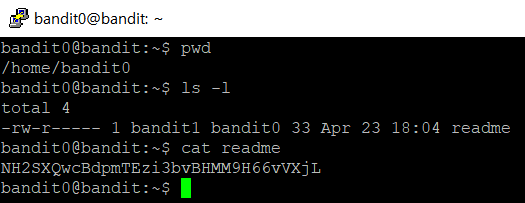
pwd로 현재 위치를 확인하고 ls -l로 bandit0의 목록을 자세히 보면 readme라는 파일이 나옵니다.
파일 내용을 확인할 때 쓰는 cat 명령어로 readme파일을 확인해보면 다음 단계로 가는 코드를 알 수 있습니다.
코드 : NH2SXQwcBdpmTEzi3bvBHMM9H66vVXjL
Bandit Level 1 → Level 2
https://overthewire.org/wargames/bandit/bandit2.html
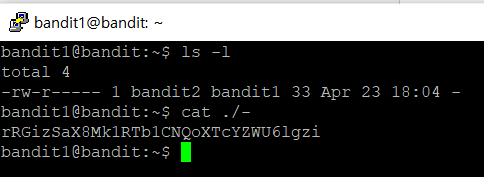
ls -l 을 하면 '-' 라는 파일이 있는 것을 알 수 있습니다. cat -하면 '-' 가 특수문자라서 인식을 못하므로 절대경로를 이용합니다.
코드 : rRGizSaX8Mk1RTb1CNQoXTcYZWU6lgzi
Bandit Level 2 → Level 3
https://overthewire.org/wargames/bandit/bandit3.html

ls -l을 해보면 "spaces in this filename" 이라는 파일 안에 내용이 있다는 걸 알 수 있습니다.
저는 cat spaces 까지 치고 자동완성 기능(tab키)를 눌러서 바로 파일 이름을 쳤습니다.
코드 : aBZ0W5EmUfAf7kHTQeOwd8bauFJ2lAiG
Bandit Level 3 → Level 4
https://overthewire.org/wargames/bandit/bandit4.html

ls -l을 하면 "inhere"라는 디렉토리를 볼 수 있습니다. "inhere" 디렉토리로 들어가서 ls -l을 하면 아무것도 안 나오므로 ls -al를 이용해서 숨겨진 모든 파일까지 보면 ".hidden" 이라는 파일을 볼 수 있습니다. cat ./.hiddent 하면 다음 단계 코드를 알 수 있습니다.
코드 : 2EW7BBsr6aMMoJ2HjW067dm8EgX26xNe
Bandit Level 4 → Level 5
https://overthewire.org/wargames/bandit/bandit5.html
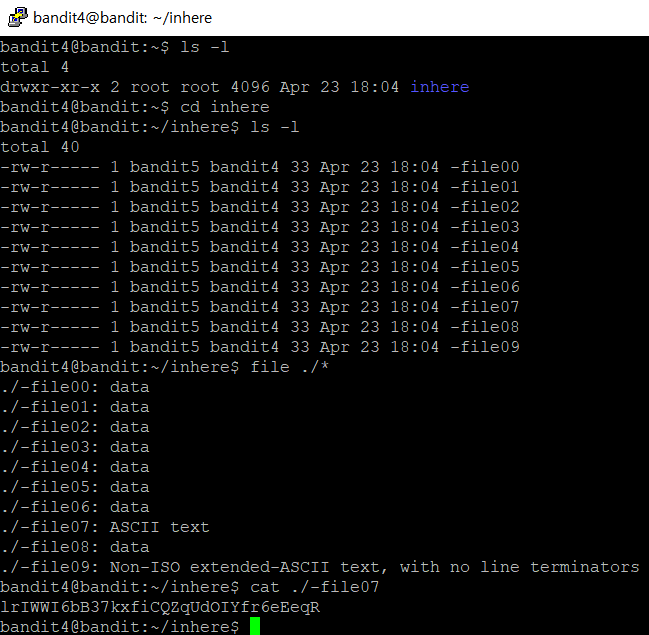
ls -l을 하면 "inhere"라는 디렉토리를 볼 수 있습니다. "inhere" 디렉토리로 들어가서 ls -l을 하면 -file00 ~ -file09까지 나옵니다. 저는 파일 유형을 찾는 명령어인 file 과 와일드 카드인 *를 이용해서 -file07에 아스키코드 텍스트가 있다는 것을 알아냈습니다. cat ./-file07을 하면 코드를 알 수 있습니다.
코드 : lrIWWI6bB37kxfiCQZqUdOIYfr6eEeqR
Bandit Level 5 → Level 6
https://overthewire.org/wargames/bandit/bandit6.html

ls -l을 하면 "inhere"라는 디렉토리를 볼 수 있습니다. "inhere" 디렉토리로 들어가서 ls -l을 하면 maybehere00 ~ maybehere19 디렉토리가 있는 걸 알 수 있습니다. 문제에서 1033바이트를 가진 파일이라고 했으므로, find 명령어에서 byte를 표현하는 c 옵션을 사용해야합니다. find ./ -size 1033c (1033byte의 파일을 찾아라)를 치면 코드가 있는 파일 위치를 알 수 있습니다. cat ./maybehere07/.file2 로 maybehere07안에 있는 .file2 내용을 열면 코드가 나옵니다.
코드 : P4L4vucdmLnm8I7Vl7jG1ApGSfjYKqJU